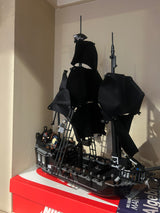
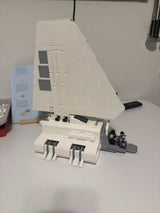
You can take sharp, good-looking LEGO photos with the phone in your pocket. Three things matter most: soft light, a steady camera and a clean background. Get those right, then add a low angle, a simple composition and a light edit. This guide walks you through each step, in the order you would do it at your table.
TL;DR
- Use soft, diffused light, such as a window or a DIY lightbox. Skip the built-in flash.
- Keep the camera steady with a tripod or a stack of books, and keep the background clean.
- Shoot minifigures from a low angle so they look bigger and more heroic.
- Clean the lens, tap to focus, and do a light edit: crop, brightness, contrast.
- Dust and fingerprints show up in close-ups, so wipe your bricks before you shoot.
Table of Contents
- Start with what you already have
- Light your model first
- Keep the camera steady
- Pick a clean background
- Clean your bricks before you shoot
- Choose angles that make the model look good
- Compose the shot
- Get focus right
- Edit lightly
- Our view: shoot the set you can show off
- Photograph different types of sets
- A quick shoot-day checklist
- Build something worth photographing
- FAQ
- Sources
Start with what you already have
You do not need a new camera. A basic smartphone can give you professional-looking results if you focus on lighting, stability and composition. The same source points to two essentials: a steady surface or tripod to prevent blur, and an uncluttered background so the model is the focal point.
Photographers who teach this say the same thing from a different angle. Canon’s macro guide argues that how light falls on your subject, and how it is softened, matters more than the gear. That is good news for LEGO builders. Your subject sits still, it is small, and you can place it anywhere you like.
Here is a basic kit that costs little or nothing:
- Your phone, or any camera you own
- A small tripod, or a phone propped against a stack of books
- White paper or a white sheet for the background
- A window, or a desk lamp with an LED bulb
- A soft cloth and a small brush for dust
- A second sheet of paper or a piece of white card to bounce light
Light your model first
Light is the biggest upgrade you can make. Plastic bricks are glossy, so harsh light creates bright hot spots and hard shadows. Soft light spreads across the surface and shows the color and the studs.
Use window light
Place your model near a window, out of direct sun. Park Cameras recommends natural, diffused window light or consistent LED lighting for home LEGO shots. A thin curtain over the window helps if the sun is strong. A photographer interviewed by Four Bricks Tall also prefers natural light over indoor lighting, which can cast harsh shadows.
Try this: put the model on a table beside the window, then slowly turn it. Watch where the glare lands on the bricks. Stop when the light shows the shape without bright spots.

Turn off the flash
Your camera’s built-in flash often creates glare on plastic bricks, according to Park Cameras. Turn it off. If the room is dim, add a lamp or move closer to the window rather than reaching for the flash.
Build a simple lightbox
A lightbox is a white shell around your model that diffuses the light. Tom Alphin’s guide describes a DIY version made from white paper or a sheet. It creates soft, overcast-like conditions that reduce the harsh shadows and reflections common with plastic.
A simple way to do it:
- Set up a table near a window or two lamps.
- Curve a sheet of white paper from the table up to a wall, so there is no hard edge behind the model.
- Hang white fabric or paper between each light and the model.
- Place the model on the curve and check the preview on your screen.
- Move a piece of white card near the dark side to bounce light back in.
This takes about ten minutes, and you can fold it away afterward.
Keep the camera steady
Low light and a shaky hand are the usual cause of blurry LEGO photos. A tripod lets the camera use a low ISO, which keeps digital noise and grain down, because it can hold still through a longer exposure. Park Cameras makes this point for home shooting.
No tripod? Try these:
- Rest the phone on a stack of books and lean it against a box.
- Use your phone’s 2-second timer so pressing the button does not shake it.
- Brace your elbows on the table and breathe out as you shoot.
If your camera has manual mode, set a low ISO and let the shutter speed run longer. If you use a phone, the same idea applies: more light means the phone can keep its settings low and clean.
Pick a clean background
A busy background pulls the eye away from your build. Use a plain surface and let the model be the only thing in the frame. White paper is a safe default. Black card or a dark fabric gives a moodier look for dark sets. The Brick Train Awards workshop stresses the uncluttered background for this reason.
Some quick checks before you shoot:
- Remove stray cables, cups and cluttered shelves from the frame.
- Keep the background a few inches behind the model so it blurs slightly and shadows soften.
- Match the background to the set. A bright white set looks good on gray. A black vehicle looks good on white.
If you display sets on a shelf and want to photograph them there, our guide to the best ways to display your sets shows setups that also work as photo spots.
Clean your bricks before you shoot
A camera at close range shows everything: dust, fingerprints, tiny hairs. Wipe each model with a soft brush or cloth. Check flat tiles and clear pieces most closely, because they hold smudges.
Older or well-handled bricks may need more than a brush. Our guide for collectors on how to clean and restore LEGO bricks covers the steps. Cleaning first saves you from spotting problems later and retouching them out.
Choose angles that make the model look good
The default phone shot is from above, looking down. It makes models look small and flat. Try getting lower.
Go low for minifigures
One toy photographer says the most flattering way to photograph a minifigure is from a low, upward angle, which makes it look imposing. On a phone, you can turn it upside down so the lens sits closer to the table, and tilt it back slightly for the upward view.
Match the angle to the model
| Subject | Angle to try | Why it works |
|---|---|---|
| Minifigure portrait | Low, slightly upward | Looks taller and more heroic |
| Vehicle | Low, front three-quarter view | Shows the front and the side in one shot |
| Large building | Eye level to the facade | Keeps the walls straight |
| Flat or detailed display | Straight down | Shows the whole layout |
| Flower bouquet | Slightly below the blooms | Fills the frame with petals |
Take several shots from each angle. Photos cost nothing, and you will often prefer the one you did not expect.
Compose the shot
Composition decides whether a photo feels deliberate. Two tools are worth learning first.
Rule of thirds. Imagine a 3x3 grid over the frame and place your subject on one of the lines instead of dead center. Most phones can show this grid in the camera settings. Adobe describes it as placing subjects along the grid, which gives more balance than centering.
Leading lines. Roads, fences, rails or a row of studs can guide the eye toward the subject. Adobe lists these as natural or constructed lines that add depth. For a LEGO city, a baseplate road leading to the front of a vehicle does the job.

Adobe also notes that these rules are tools for decisions, not strict requirements. If a centered shot suits the scene, use it.
Tell a story as well. The appeal of LEGO photography, as Park Cameras notes, is that the challenge is imagining and building a scene around the model, not buying equipment. A minifigure holding a flashlight in a dark corner says more than the same minifigure standing on a table.
Get focus right
At close range, the area in focus is thin. A model can look sharp at the front and soft at the back.
- Tap to focus. On a phone, tap the part of the model you care about, usually the face or the front.
- Clean the lens. A smudge on the phone lens makes everything look hazy. Wipe it with a soft cloth.
- Back up a little. Phones often cannot focus very close. Step back and crop later.
- Avoid extreme apertures on a camera. Canon advises against settings like f/25 and says a lens’s sweet spot is typically between f/8 and f/11.
- Stack focus for deep subjects. If one shot cannot keep the whole model sharp, Canon suggests focus stacking: merge several shots taken at different focus points in editing software.
For a vehicle, focus on the front and make sure the camera is level with the model. For a minifigure, focus on the eyes.
Edit lightly
A small edit makes a big difference. Open your photo in your phone’s built-in editor or a free app, and adjust:
- Crop so the model fills the frame and nothing distracting sits at the edges.
- Brightness and contrast so whites look white and colors stay true.
- Straighten so shelves and rooflines are level.
- Retouch tiny dust spots if any remain.
Keep the edit honest. Park Cameras suggests software should enhance or complete the vision you started on set, not replace it.
Our view: shoot the set you can show off
We talk to builders every day, and one thing shows up again and again: people want to share what they build. A good photo helps. It shows off the work you put in, and it helps you spot problems, like a loose piece or a skipped step, while you still have the model in front of you.
Here is how we think about it. Photograph the set as it sits. Do not hide a mismatched brick or a gap. If every piece fits and the instructions are clear, the model looks clean on camera without tricks. That is why we care about compatibility and detailed building instructions. A set that clicks together properly looks better in the photo and on the shelf.
A few habits we suggest:
- Take a “before” photo when you finish a build. It is a nice record, and it helps if you later want to do an alternate build.
- If your set has lights, check them before you shoot. Our light kit maintenance guide covers a quick fix. Then try one photo with the lights on in a dim room, with the camera on a tripod.
- Photograph a set in the same spot each time. A consistent background makes a collection look like a series.
— Affordable Bricks Editor
Photograph different types of sets
Minifigures
Get low, keep the background simple and add one prop. A tiny scene can be a few bricks and a sheet of paper. Fill the frame, and focus on the face.

Vehicles
Vehicles look best with a low three-quarter angle and a plain or road-style background. Make the wheels sit flat, and leave room in front of the vehicle so it seems to move into the frame. If you like cars and trucks, browse our vehicle sets for builds that photograph well.
Buildings and large displays
Use more distance and keep the camera level to avoid slanting walls. Light from the side so windows, doors and textures show. Take a wide shot and a few detail shots.
Brick bouquets
Flowers are colorful, so a neutral background helps the colors stand out. Soft window light is best. If you want ideas for what to build, see our brick bouquet ideas.
A quick shoot-day checklist
- Dust the model and wipe the phone lens.
- Set up a white or neutral backdrop with no hard edge.
- Place the model near a window, or build a paper lightbox.
- Turn off the flash.
- Steady the camera on a tripod or books.
- Shoot low, then try two or three other angles.
- Tap to focus on the key part.
- Take many shots, pick the best, and crop and adjust it.
The whole routine takes about 15 minutes once you have done it a few times.
Build something worth photographing
Good photos start with a good build. At Affordable Bricks, we sell LEGO-compatible sets at accessible prices, with detailed building instructions and pieces that fit. You can look through replica sets, themes and seasonal sets or head straight to vehicles. Veterans and first responders get discounts too. Shop now and build something you will want to show off.

FAQ
Can I take good LEGO photos with just my phone?
Yes. A basic smartphone is enough when you control light, keep the camera steady and use a clean background. Turn off the flash, shoot near a window and tap the screen to focus. These steps matter more than the camera.
What is the best light for photographing LEGO?
Soft, diffused light works best. Window light, or an LED lamp shining through white paper or fabric, spreads evenly and cuts glare on the glossy plastic. Avoid your camera’s built-in flash, which often causes hot spots on bricks.
How do I make minifigures look more dramatic?
Shoot from a low angle, looking slightly up. This makes the figure look taller and more imposing. Turning your phone upside down puts the lens near the table, which makes that angle easy.
Do I need a tripod?
It helps, especially in dim light, because a steady camera can use a low ISO and give cleaner images. If you do not have one, prop the phone on books and use the timer so you do not shake it when you press the shutter.
How do I keep the whole model in focus?
Tap to focus on the most important part, and step back a bit instead of getting too close. On a camera, avoid very small apertures and aim for the lens’s sweet spot. For deeper models, focus stacking merges several shots into one sharp image.
Sources
- How to take better photos of your LEGO models, Brick Train Awards
- Photographing LEGO at Home (Tips & Tricks), Park Cameras
- Bringing LEGO Minifigures to Life: Phone Photography Tips from k.c.legos, Four Bricks Tall
- Best way to Photograph LEGO models (with a Lightbox), Tom Alphin
- Getting Started with Macro, Canon U.S.A.
- Macro Photography: How to Look Sharp, Canon U.S.A.
- 15 essential composition techniques, Adobe
- Elevate Your Photography with Composition Techniques, Adobe